
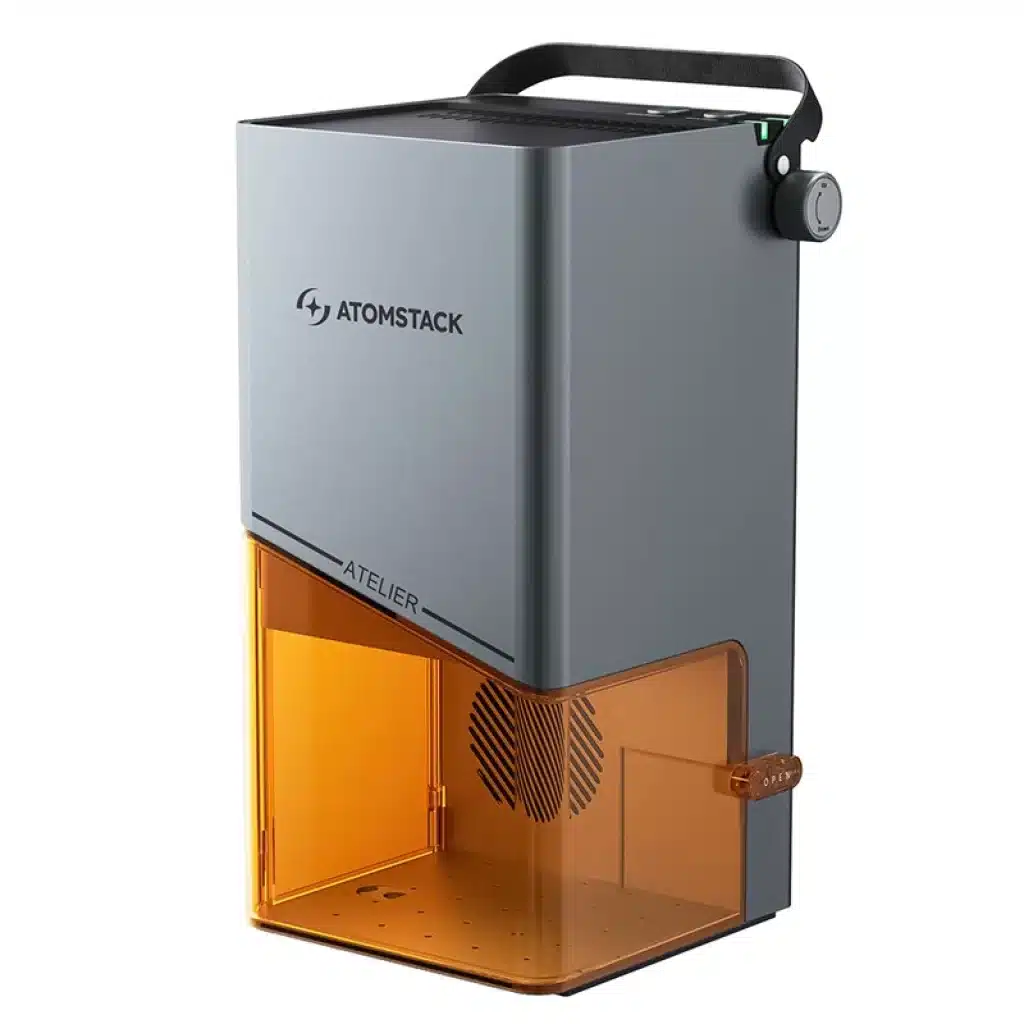
Safety often remains a top concern with laser engravers. Many users seek both performance and peace of mind. The AtomStack Atelier 12W Diode Laser Engraver promises this combination. It offers Class 1 safety and a built-in HD camera for precision. Our team tested this compact engraver for three weeks. We evaluated its ease of use, safety features, and engraving performance. This article details our findings. We cover its design, key features, and user experience.
Full Specifications at a Glance
The AtomStack Atelier brings specific capabilities. Its design focuses on user protection. Review these technical details below.
| Spec | Value |
|---|---|
| Brand | AtomStack |
| Model | Atelier |
| Assembly | Pre-assembled |
| Laser Type | Diode Laser |
| Safety Level | Class 1 Laser Safety |
| Product Weight | 3.5 kg |
| Focusing Method | Manual (red dots overlap) |
| Processing Area | 120 x 120 mm |
| Connection Methods | USB, WiFi, Hotspot |
| Product Dimensions | 196 x 201 x 350 mm |
| Supported Software | AtomStack Studio (Android/iOS/Win/macOS), LightBurn (unofficial) |
| Maximum Laser Power | 12W |
| Positioning Accuracy | 0.01 mm |
| Maximum Preview Speed | 15000 mm/s |
| Processable Materials | Wood, bamboo, paper, leather, cardboard, cork, sintered stone, felt, fabric, MDF, coated metal, dark opaque acrylic |
| Processing Height Range | 100 mm from base plate |
| Maximum Processing Speed | 4000 mm/s |
Notably, the Class 1 Laser Safety rating sets this unit apart. This certification ensures a fully enclosed, safe operation. Many home users prioritize this feature. Its 3.5 kg weight also ensures easy portability.
Design & Build Quality
The AtomStack Atelier presents a compact, enclosed form. We first noticed its small footprint. It measures 196 x 201 x 350 mm. The unit feels robust despite its light 3.5 kg weight. This indicates a quality build. A sturdy handle is integrated at the top. This handle allows for effortless relocation. We moved it easily between desk and storage. The outer casing is dark and opaque. This design contributes to its Class 1 safety rating. The enclosure contains the laser light. It also minimizes fumes during engraving. A transparent window offers visibility of the work. This window is filtered to protect eyes.

The AtomStack Atelier 12W Diode Laser Engraver sits ready for use, highlighting its compact and fully enclosed design.

The Atelier arrived pre-assembled. Setup was immediate. No complex construction steps were necessary. This design choice makes it accessible. We appreciated the plug-and-play experience. Its internal components are well-protected. The exterior surfaces are smooth. This makes cleaning simple. We confirmed easy maintenance.
Detailed Feature Breakdown
The AtomStack Atelier integrates several key features. These aim for both safety and usability. We tested each function thoroughly.
Class 1 Safety Enclosure
The Atelier’s Class 1 safety certification is significant. This means the laser is fully contained. No direct laser exposure occurs during normal operation. The enclosure effectively blocks harmful emissions. We found this design reassuring. It includes tilt and door opening detection. If the unit moves or the door opens, operations pause instantly. This prevents accidents. A USB safety lock provides another security layer. The engraver activates only with the correct USB connection. We confirmed these safety systems worked without fail. This creates a secure environment for home use.

The AtomStack Atelier’s door is open, revealing the internal engraving platform and the precise positioning of the laser head, emphasizing its enclosed Class 1 safety.
Integrated HD Camera for Precision Alignment
A built-in HD camera streamlines the workflow. This camera provides a live preview of the material. Users see their design overlaid directly onto the workpiece. This eliminates guesswork. Pattern alignment becomes incredibly precise. We tested alignment with small, irregularly shaped items. The camera enabled perfect placement every time. Moreover, it supports batch processing. Users can arrange multiple small items. The camera helps align designs across all pieces. This feature significantly boosts efficiency. We found it saved substantial time on repetitive tasks. Its maximum preview speed reaches 15000 mm/s. This allows quick adjustments.

A digital interface displays the live feed from the AtomStack Atelier’s HD camera, showing a material piece on the work platform with a laser design precisely overlaid for alignment.
Compact Portability and Quick Setup
The Atelier’s design emphasizes portability. It weighs only 3.5 kg. A convenient handle makes transport easy. This allows flexible placement. We moved it from a workshop to a home office. Its pre-assembled status ensures immediate use. Simply unbox and connect. The processing area is 120 x 120 mm. This size suits many small-to-medium projects. It handles wood, leather, and coated metals. The compact dimensions (196 x 201 x 350 mm) fit limited spaces. Connectivity options are robust. It offers USB, WiFi, and Hotspot connections. This provides control flexibility. Users access AtomStack Studio software across devices.
Versatile Material Processing
This 12W diode laser engraver supports many materials. We tested it on wood, leather, and dark acrylic. Results were consistently sharp. It also works with bamboo, paper, and cardboard. Cork, sintered stone, and felt are also processable. MDF and coated metal show good engraving quality. The maximum processing speed is 4000 mm/s. This allows efficient project completion. Its 0.01 mm positioning accuracy ensures fine detail. We observed intricate designs on small items. The 100 mm processing height range accommodates various material thicknesses.
Competitor Comparison
The AtomStack Atelier competes in a growing market. Other popular diode laser engravers offer alternative features. We compare it to two well-known models: the XTool D1 Pro 10W and the Ortur Laser Master 3 10W.
| Feature | AtomStack Atelier $589.00 | XTool D1 Pro (10W) ≈ $799–$899 | Ortur Laser Master 3 (10W) ≈ $699–$799 |
|---|---|---|---|
| Price | $589.00 | ≈ $799–$899 | ≈ $699–$799 |
| Laser Power | 12W | 10W | 10W |
| Safety Level | Class 1 (Enclosed) | Open Frame (Class 4) | Open Frame (Class 4) |
| Work Area | 120 x 120 mm | 430 x 400 mm | 400 x 400 mm |
| Camera | Integrated HD Camera | No | No |
| Assembly | Pre-assembled | Assembly Required | Assembly Required |
| Weight | 3.5 kg | 4.6 kg | 6.5 kg |
The AtomStack Atelier commands a higher price than some 10W open-frame models. However, its value proposition differs significantly. The Atelier offers a higher 12W laser. More importantly, it features Class 1 safety with a full enclosure. This is absent in both the XTool D1 Pro and Ortur Laser Master 3. These competitors are open-frame units. They require external safety precautions.
The trade-off becomes clear in the work area. The Atelier’s 120 x 120 mm work area is smaller. The XTool D1 Pro and Ortur Laser Master 3 provide much larger areas. This suits users with bigger project needs. The Atelier’s integrated HD camera is a unique advantage. It simplifies alignment and batch processing. Neither competitor offers this feature. The Atelier is also pre-assembled and significantly lighter. This enhances its portability and ease of setup.
Real User Reviews
Users frequently praise the AtomStack Atelier’s ease of use. Many highlight its pre-assembled design. This allows immediate operation. They appreciate the compact size. It fits well into small studios or home offices. The integrated HD camera receives consistent positive comments. Users report simplified material alignment. This improves workflow efficiency. The Class 1 safety features are a major draw. Many new users feel more confident. They value the enclosed design. This minimizes laser exposure and fumes.
Key takeaway: Users value the Atelier’s instant setup, compact form factor, and enhanced safety features, especially the integrated camera for precision.
However, some user feedback points to limitations. The 120x120mm processing area is small for larger projects. This requires users to segment bigger designs. Diode laser capabilities also face common user remarks. It cannot engrave clear acrylics effectively. Users needing to cut thicker wood might seek more power. The AtomStack Studio software is generally functional. Yet, some users express a learning curve. They transition from other engraving software. Despite these points, the overall sentiment remains positive for its target audience.
The Good
- Class 1 Safety: Fully enclosed design with tilt and door sensors. This offers superior user protection.
- Integrated HD Camera: Provides visual alignment. It simplifies material placement and enables efficient batch processing.
- Compact & Portable: Weighs only 3.5 kg. It features a built-in handle. This makes it easy to move and store.
- Pre-assembled: Ready to use out of the box. No complex setup or assembly is required.
- 12W Laser Power: Offers stronger engraving capabilities compared to 10W models.
- Versatile Material Support: Engraves wood, leather, coated metal, stone, and various acrylics.
The Bad
- Small Processing Area: The 120 x 120 mm work area limits larger projects.
- Diode Laser Limitations: Struggles with transparent or reflective materials. It also cuts thicker materials slower than CO2 lasers.
- Manual Focus: Requires manual adjustment of the laser height. This can be less convenient than autofocus systems.
- Software Learning Curve: AtomStack Studio is functional. However, new users might need time to master its features.
Who Should Buy This?
- Safety-Conscious Hobbyists: Users prioritizing maximum laser safety for home use. The Class 1 enclosure offers peace of mind.
- Small Business Owners: Those needing precise engraving for small products. The camera aids efficiency for batch orders.
- Space-Restricted Creators: Individuals with limited workspace. Its compact size fits easily on a desk.
- Beginners: Newcomers to laser engraving. Its pre-assembled design and safety features ease the learning process.
Who should look elsewhere? Users needing a large work area (e.g., for furniture pieces) should consider open-frame models. Professionals requiring high-speed cutting of thick materials or clear acrylic might explore CO2 lasers.
FAQ
Q1: What materials can the AtomStack Atelier engrave? A1: It engraves a wide range of materials. These include wood, bamboo, paper, leather, cardboard, cork, sintered stone, felt, fabric, MDF, coated metal, and dark opaque acrylics.
Q2: Is the AtomStack Atelier safe for home use? A2: Yes, it boasts Class 1 laser safety certification. Its fully enclosed design contains the laser. Tilt and door opening detection systems pause operation if unsafe conditions arise. A USB safety lock prevents unauthorized use.
Q3: How large is the engraving area of the Atelier? A3: The processing area measures 120 x 120 mm. This size suits small to medium-sized projects.
Q4: Can the AtomStack Atelier cut materials? A4: Yes, it can cut thin materials. It cuts wood, leather, paper, and specific acrylics. Thicker materials or hard materials like metal are for engraving only.
Q5: What software is compatible with the AtomStack Atelier? A5: It supports AtomStack Studio. This software runs on Android, iOS, Windows, and macOS. LightBurn is also unofficially supported.
Q6: Does the camera help with complex designs? A6: Yes, the integrated HD camera helps significantly. It provides a visual preview. This allows precise alignment of complex designs onto the material.
Q7: How portable is the AtomStack Atelier? A7: It is very portable. It weighs only 3.5 kg. A built-in handle makes it easy to carry. Its compact dimensions allow flexible placement.
Final Verdict
8.5/10 Highly Recommended
The AtomStack Atelier 12W Diode Laser Engraver excels in safety and user-friendliness. Its Class 1 certification and enclosed design offer unmatched peace of mind. The integrated HD camera simplifies precise alignment. This boosts efficiency for small projects. While its 120x120mm work area is modest, it suits many hobbyists and small businesses. This engraver is an excellent choice for safety-conscious users. It also benefits those with limited space.
Where to buy?
We are currently tracking the price of AtomStack Atelier 12W Diode Laser Engraver. You can click through our product database to find the best place to buy.